refariUserSession, RefariLoggedIn (Refari, 1 year): Keeps you signed in when you sign in to a Refari feature.
refari_jb_registered (Refari, Until you close the tab): Remembers that you have just registered (browser storage).
_grecaptcha (Google reCAPTCHA, Until you clear it): Keeps automated spam out of the forms; set only once you start using a form (browser storage).
_GRECAPTCHA (Google reCAPTCHA, 6 months): Google’s own cookie for the same check, on google.com; set only once you use a form.
Facebook and LinkedIn sign-in (Meta, LinkedIn, Set by them): Only if you choose “Continue with Facebook” or LinkedIn: their own cookies for signing you in.
Analytics
_ga (Google, 2 years): Tells visits apart to count visitors.
_ga_* (Google, 2 years): Keeps the state of a visit.
Set by the code (Ahrefs Web Analytics, Varies): Code this site added; it may set its own cookies.
Refari visit counts (Refari, No cookies): Counts page visits for us without cookies. Your browser sends the page, the site you came from and your device type. Your IP address is not kept, and we see totals only. A local setting, rf-nocount, is stored only if you ask us not to count your visits.
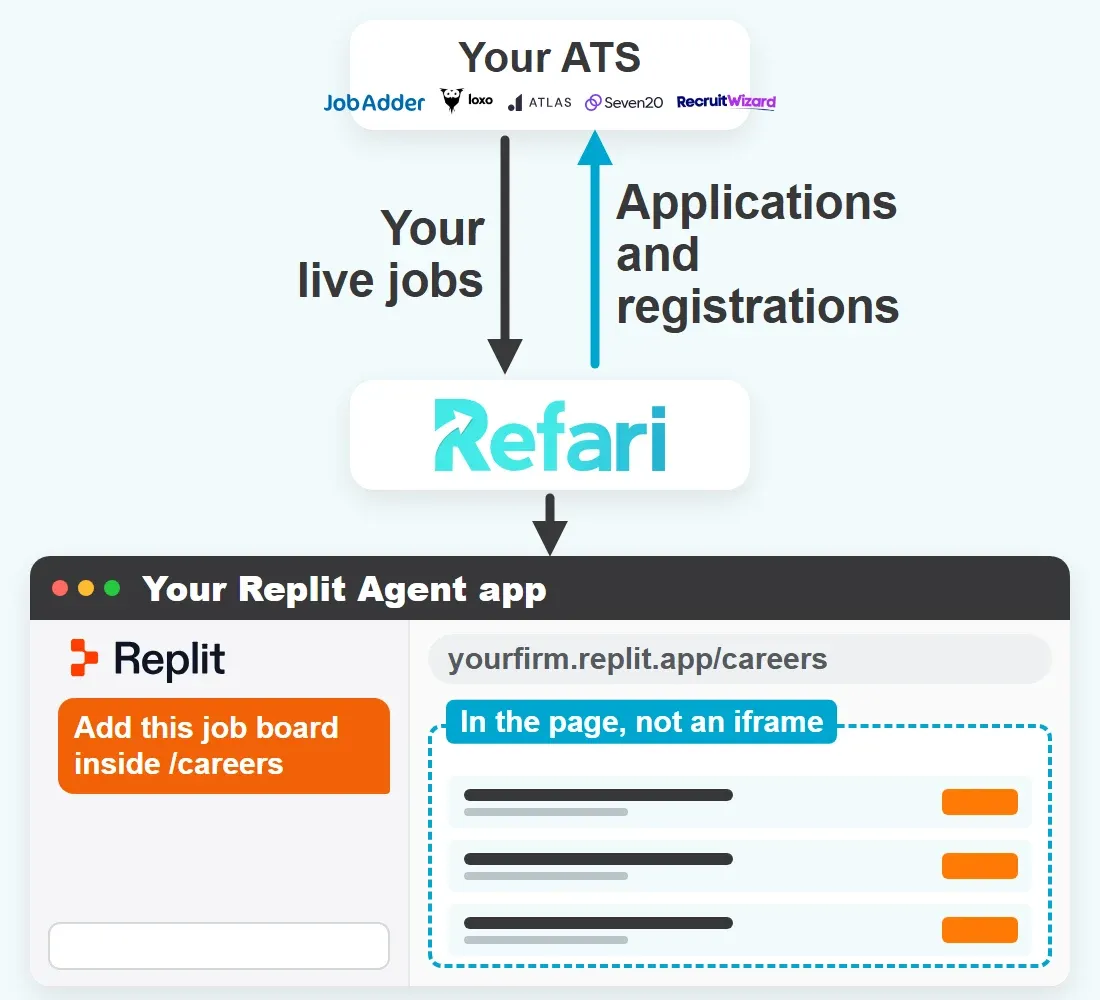
Did Replit Agent build your website? Hand Agent the Refari embed code and it can write a live job board, job alerts and registration forms into your careers page, with every application landing in the ATS you already use.
From Embed Code to a Published Replit Careers Page
Replit has no embed element and its docs describe no site-wide setting for custom code, so the job board goes into your app’s own code. The simplest way to put it there is to ask Replit Agent, which writes and runs the code for you.
1
Copy Your Widget Code
Sign in to Refari as an Admin or Manager, open Widgets, pick the job board, choose its colours and layout, and press COPY ALL. The copied block holds three short Refari scripts (a queue, the loader and your configuration) and an empty container for the board.
2
Ask Agent to Add It
Open the Agent panel in your Replit App and paste the example prompt below with your code inside it. Agent decides which files to change and shows you its work as it goes.
3
See Where It Went
Open Files in the workspace sidebar and find the careers page Agent edited, so you know where the board lives if you ever need to ask for a change.
4
Publish as a Public App
Choose Publish at the top right of the workspace, or Tools > Publishing, and set access to Public so candidates can open the page. After later edits, choose Republish.
5
Point Refari at the Page
Under Settings > Job Board Settings in Refari, set the Base URL to the live careers address, so links in job alerts and emails open there.
6
Test the Live Address
Open the careers page on its replit.app or custom address, not in Preview. Open a registration form: if reCAPTCHA loads without “Invalid domain”, the code sits in the page itself. Then open a job, copy the address into a new tab, and click a job link in a Refari job alert email: both should open that job.
Example prompt for Replit Agent
Please add our Refari job board to the Careers page of this app. The code is below; keep it exactly as written.

[paste the COPY ALL code from Refari here]

Requirements:
- Keep the container div and its id exactly as pasted, inside the Careers page itself. Never put the code in an iframe, an iframe srcdoc or an embed element.
- Keep the Refari scripts in their original order. Load the Refari loader script once for the whole app; do not add it twice.
- Run the configuration only after the loader has loaded, and run it each time the Careers page mounts, so the board appears after moving between pages too.
- No raw script tags inside JSX, and no scripts inserted through innerHTML or dangerouslySetInnerHTML.
- If this app uses Next.js, make a client component that renders the container and loads the loader with next/script, running the configuration in that Script’s onReady callback.
- Keep the page address’s query string and the part after #, so job links from Refari open the right job.
- Tell me which files you changed.
The square-bracket line is where your own COPY ALL code goes; it already carries your Refari API key.
Where a Replit Job Board Usually Goes Wrong
Because Agent writes real code, the widget behaves like any script on any web page. When it does not, one of these is nearly always the reason.
Checking Only in Preview
Replit calls the Preview pane private and temporary, meant for development, and its own guide says to test the live URL as well.
Publish, then judge the board on the published address.
Edits That Never Went Live
Changes you make in the workspace stay out of the published app until you republish, so the live careers page can lag behind what you see.
Choose Republish after every change you want candidates to see.
Script Tags That Never Run
If Agent writes the block into a component as markup, through innerHTML or dangerouslySetInnerHTML, the browser skips the scripts and the container stays empty.
Ask Agent to load the Refari scripts as real scripts, in their original order.
Code Wrapped in an Iframe
Forms inside a frame show “Invalid domain” from reCAPTCHA, and job links and filters stop working, because the frame has no address of its own.
Ask Agent to move the code out of the iframe and into the page.
A Later Agent Edit Removed It
When you ask Agent for an unrelated change, it may rewrite the careers file and drop the embed with it.
Ask Agent to keep the Refari code, or roll back with History or Checkpoints.
The Starter App Expired
On the free Starter plan your one published app expires after 30 days, and the careers page goes with it until you republish.
Republish in time, or move to Core or Pro for a site that stays up.
Trusted By
Join the Success: 400+ Companies Thriving with Refari!
Replit Plans, Publishing and Your Own Domain
Publishing is on every Replit plan, but a careers page has to stay up, look like your firm and sit on your domain. These are the points from Replit’s documentation that matter for that.
Agent builds full-stack apps with a server, and Replit says Static deployments are not compatible with them, so an Agent site runs on an Autoscale or Reserved VM deployment. Its running cost comes out of your monthly credits.
Starter is free: one published app, expiring after 30 days unless republished, with a “Made with Replit” badge
Core and Pro allow more published apps and remove the badge
Autoscale starts at $2 a month plus usage; Reserved VM from $15 a month
Tools > Domains connects a domain you already own with A and TXT records
Keep the replit-verify TXT record after the domain shows Verified
Add www as its own domain, and on Cloudflare use DNS only (grey cloud)
Your ATS Behind a Replit Careers Page
Agent places the same Refari code whichever ATS you use. What changes is what flows between that ATS and Refari, and the one check worth making on Replit.
JobAdder
What flows
Refari’s own two-way integration: JobAdder webhooks put new and expired ads on your Replit board straight away, and edits to a live ad follow within a few hours. Applications and registrations go into JobAdder, a referral arrives as a candidate record for the person referred, and referrals logged in JobAdder and candidate stages come back to Refari.
Watch for on Replit
Set the Base URL to the published Replit careers address, never the Preview pane, then click a job link in a JobAdder job alert email to confirm the right job opens. Screener answers reach JobAdder fields only once mapped under Tools > Question Mapping.
Through the Refari Integrator, Loxo webhooks bring published, active jobs, edits and closures to your Replit board within minutes. Applications, registrations and referrals go to Loxo, Refari reads the stages in your Loxo workflow, and screener answers stay in Refari.
Watch for on Replit
Loxo’s own careers page stays as it is, so if Agent copied an older Loxo jobs frame into your app, ask it to remove the frame and keep only the Refari board.
Refari picks up public Atlas projects about every 10 minutes, with a fuller check every few hours. Applications, registrations and referrals go back to Atlas, and candidate stages come back for referral tracking and TopRec review requests on placement.
Watch for on Replit
An empty Replit board with live work in Atlas is nearly always an Atlas setting, such as a missing Job Board Category, not Agent’s code. Allow 10 to 12 minutes after saving a project before you look.
Seven20 built this integration on Refari’s API for its Salesforce-based recruitment CRM. The jobs it sends appear on your Replit board, applications and registrations go to Seven20, referrals stay in Refari, and candidate stages are not sent back.
Watch for on Replit
A Seven20 job with no closing date, recruiter, category, work type or location never reaches Refari, so check the job in Seven20 before asking Agent to change the page.
RecruitWizard built this integration: each job you advertise in RecruitWizard is sent to Refari for your Replit board, with its changes and closures. Applications, registrations and referrals go to RecruitWizard; candidate stages are not sent back.
Watch for on Replit
When you ask Agent for other changes, have it keep the Refari code on the careers page. If an edit drops it, nothing reaches RecruitWizard until you restore it from History or Checkpoints and republish.
What recruitment teams ask before putting a Refari job board on a website that Replit Agent built.
Can I run a Refari job board on a site built with Replit Agent?
Yes. Agent writes ordinary web code, and Refari widgets are plain JavaScript, so once the embed code sits inside your careers page the board loads your live jobs there.
Where does the Refari code go in a Replit App?
In the careers page’s own code. Replit has no embed element, so paste the code into the Agent chat and ask Agent to add it to the page itself, not in an iframe.
Can I test the job board in Replit’s Preview pane?
Test it on the published app. Replit calls Preview private and temporary, and says to check the live URL.
Is Replit’s free Starter plan enough for a careers page?
Not for long. Starter allows one published app that expires after 30 days unless you republish it, and shows a “Made with Replit” badge. Core or Pro keeps a careers site up without the badge.
Can my Replit careers page use our own domain?
Yes. Under Tools > Domains choose “Use a domain you already own”, add the A and TXT records, and wait for Verified. Replit’s docs do not state a plan requirement, so check yours.
Why do my Refari forms say “Invalid domain” on Replit?
Because the code is running inside a frame. Ask Agent to take it out of the iframe and place it in the page’s own HTML or component, then republish.
Do Refari job links work on a Replit site?
Test it on your live app: Replit does not document query strings. Open a job on the published board, copy the address into a new tab, then click a job link in a Refari job alert email. Both should open that job.
The board vanished after I asked Agent for another change. What happened?
Agent probably rewrote the careers file. Ask Agent to restore the Refari code, or roll back to an earlier state with History or Checkpoints.
Will my jobs reach Google for Jobs from my Replit site?
Not from the widget. Google for Jobs reads a page per job, while the job board shows jobs inside your careers page. Google for Jobs comes with a website Refari builds, where each job has its own page.
Can I move my Replit site elsewhere and keep the board?
Yes. Replit’s Git pane syncs your code to GitHub, and the Refari embed code is not locked to one domain. If the careers address changes, update the Base URL in Refari.
Prefer Not to Run the Site Yourself? Meet Refari Websites 2.0
A Replit Agent app with Refari widgets gives you a working job board that you own and publish. It does not give each job a page of its own, and that is what Google for Jobs reads. Refari Websites 2.0 does: Refari builds and hosts your site, every job gets its own page, and you ask for changes in plain English instead of prompting Agent and republishing.
What you getRefari widgets on your Replit appRefari Websites 2.0
Live job board from your ATSRefari widgets on your Replit app: Yes, with search, filters, job alerts and referralsRefari Websites 2.0: Yes, built into the site
Applications into your ATSRefari widgets on your Replit app: Yes, through the Refari forms in the widgetRefari Websites 2.0: Yes, the same forms
Google for JobsRefari widgets on your Replit app: Not from the widget: jobs open inside your careers page, with no page of their own for Google to readRefari Websites 2.0: Included: every job has its own page with the job posting markup Google for Jobs reads
Who builds and looks after itRefari widgets on your Replit app: You, in your builder, on your planRefari Websites 2.0: Refari builds and hosts it, and you ask for changes in plain English
Great platform and service - they really go above and beyond for their clients! Refari's support is unmatched by any other website and technology partner we've ever used. They manage all website plug-ins that help us easily serve our candidates and clients.
G
Gemma Valentine
Refari has been a great asset to our business for all of the products and services that they offer. Aaron, Ritesh and the team are really quick and helpful, smart and passionate people who get recruitment.
R
Rachael Newton
Aaron and his team are amazing! Their advice has helped us improve the look and effectiveness of our website. I would highly recommend them.
Good Moves
I have worked with Refari on a couple of projects and I couldn't recommend them enough! The tech is the best on the market, their team are efficient, innovative and supportive. I have worked with a few other recruitment website suppliers over the years, I don't want to name names (bright pink) and they out beat and perform them in every sense! You can't go wrong with Refari
Emma Tawse
Working with Refari has been standout. A web developer who not only understands but embraces the need for design perfection is rare – and his collaborative approach makes the process seamless. He brings thoughtful UX insight that elevates our design work, and the end results are always stronger because of his input. Quite simply, the best web developer I’ve had the pleasure of working with.
Jay Daviot
Aaron and his team have been great to deal with throughout the entire process. Quick to act, responsive to our queries and worked through things methodically with an eye for detail. Couldn't recommend them more highly.
Ryan Corp
We had a fantastic experience working with Refari. Aaron and his team was professional, responsive, and really took the time to understand what we needed for our website. The end result was modern, easy to use, and exceeded our expectations. Communication throughout the process was clear and friendly, and they made the whole experience stress-free. I’d happily recommend Refari to anyone looking for a reliable and creative website partner!
Julianne Haines
Aaron is very prompt with responses and edits I highly recommend his service
Chris Twine
We've worked with Aaron and his team at Refari for over a year now, they've been great from the start. Always helpful, knowledgeable and willing to assist with any website development needs.
Liam Hynes
Super quick response and action time, really helpful and knows the industry to modern standards 5*
Theo Venables
Great team. Really responsive and explain things in a way that actually makes sense, even if you are not tech savvy.
Ellen Babij
Aaron and the team at Refari are great! Fab product and fab support. They go above and beyond for their clients and are always just an email away!
Vercel, the Vercel design, Next.js and related marks, designs and logos are trademarks or registered trademarks of Vercel, Inc. or its affiliates in the US and other countries.