refariUserSession, RefariLoggedIn (Refari, 1 year): Keeps you signed in when you sign in to a Refari feature.
refari_jb_registered (Refari, Until you close the tab): Remembers that you have just registered (browser storage).
_grecaptcha (Google reCAPTCHA, Until you clear it): Keeps automated spam out of the forms; set only once you start using a form (browser storage).
_GRECAPTCHA (Google reCAPTCHA, 6 months): Google’s own cookie for the same check, on google.com; set only once you use a form.
Facebook and LinkedIn sign-in (Meta, LinkedIn, Set by them): Only if you choose “Continue with Facebook” or LinkedIn: their own cookies for signing you in.
Analytics
_ga (Google, 2 years): Tells visits apart to count visitors.
_ga_* (Google, 2 years): Keeps the state of a visit.
Set by the code (Ahrefs Web Analytics, Varies): Code this site added; it may set its own cookies.
Refari visit counts (Refari, No cookies): Counts page visits for us without cookies. Your browser sends the page, the site you came from and your device type. Your IP address is not kept, and we see totals only. A local setting, rf-nocount, is stored only if you ask us not to count your visits.
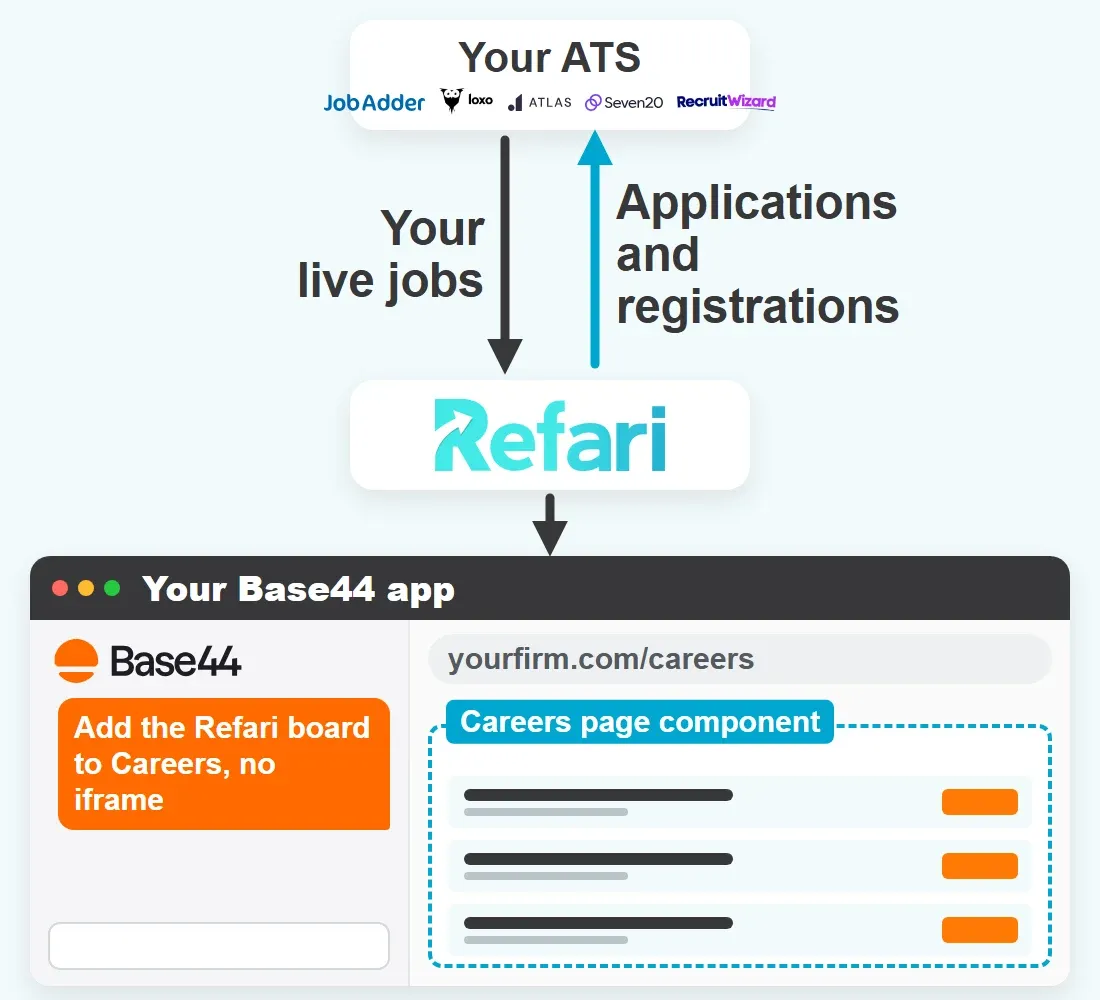
Made your website with Base44? Ask the Base44 chat to place your Refari embed code on the careers page, or add it yourself in the Code tab, and visitors get searchable jobs, job alerts and referral forms, and every application goes straight to your ATS.
How Base44 Builds Your Site, and Where Refari Fits
Base44 is an AI app and website builder: you describe what you want in a chat, and it produces the app with its own database, sign-in and hosting. The front end is React with React Router, built with Vite and styled with Tailwind CSS, so your site is a single page app that draws each page in the visitor’s browser.
A Refari widget is plain JavaScript: a container, a loader and a configuration script. Once those sit in a page of your app, the board runs in that page, lists your jobs and takes applications.
Nothing to install in Base44: the code goes into the app itself
Jobs load from Refari, so none of them is stored in your Base44 database
Job board, job alerts, registration and referral widgets all go in the same way
Your ATS stays where you work; Base44 stays where you design
Adding Refari to Base44, Step by Step
Base44 has no embed element, no custom code block and no site-wide head setting. Its own docs give two ways to add a third-party script: ask the AI chat to do it, or edit the code yourself in the Code tab. Base44 lists in-app code edits from its Starter plan up, so check your plan first.
1
Copy the Code From Refari
Open Widgets in your Refari dashboard, pick the job board, choose its colours and layout, then click COPY ALL. The look you choose is written into the code, and only a Refari Admin or Manager sees Widgets.
2
Send the Prompt in Discuss Mode
Base44 shows its plan and changes nothing until you click Approve; Discuss messages still use about 0.3 credits each. Build mode acts straight away instead. Paste your copied code over the bracketed line in the prompt below.
3
Or Edit the Code Tab Yourself
Under Dashboard > Code, put the container in your careers page component and load the scripts from a useEffect (script tags pasted into the markup will not run), then click Save.
4
Click Publish
Press Publish at the top right. The editor preview is private to you and your collaborators, and Base44’s docs tell you to check scripts on the published app, the version visitors load.
5
Set the Base URL
In Refari, set the Base URL under Settings > Job Board Settings to your published careers page, so job links in alert emails open your Base44 site.
6
Test Job Links and a Form
On the live app, open a job: the board adds #detail?jbJob= and the job’s number to the address. Copy that address into a new tab, click a job link in a Refari job alert email, then submit a registration form and confirm reCAPTCHA loads cleanly.
Example prompt for the Base44 chat
Add the Refari job board to our Careers page. Here is the code from Refari’s COPY ALL button:

[paste the COPY ALL code from Refari here]

Please:
- In the Careers page component, render the container div exactly as pasted and keep its id unchanged. Show it at full width with no fixed height.
- Do not put the script tags into the JSX. Load the Refari scripts, in their original order, from a useEffect.
- Add the Refari loader script to the page only once. If it is already on the page, do not add it again.
- Run the configuration script only after the loader has loaded (straight away if it already has), and do this each time the Careers page mounts.
- Never place the code inside an iframe or an embed element.
- Keep the page address as it is, including the query string and the part after #.
- Do not add a <noscript> tag to the <head> of index.html.
The code from COPY ALL already holds your API key, so paste it over the bracketed line exactly as copied.
Where Base44 Careers Pages Usually Go Wrong
A Refari board that misbehaves on Base44 nearly always comes down to where the code landed in the app, or who is allowed to see it. Check these six first.
Scripts Pasted as JSX
React does not run a <script> tag written into a component’s markup, so a block pasted that way leaves an empty container.
Ask Base44 to load the scripts from a useEffect instead.
Configuration Only in index.html
React Router swaps pages without a reload, so a configuration script in index.html runs once at first load and can miss a careers container that mounts later.
Run the configuration each time the careers page mounts, after the loader has loaded.
A Careers Page Behind a Sign-In
Base44’s Private and Workspace apps make every visitor sign in, so candidates never reach the board.
Set App Visibility to Public under Dashboard > Overview.
A Noscript Tag in the Head
Base44’s docs warn that a <noscript> tag in the head of index.html stops the app loading in the editor. The Refari block needs none there.
Leave <noscript> out of the head.
Testing in the Editor Preview
The preview beside the chat is not what candidates see. Base44’s docs point you to the published app for checking scripts.
Publish, then test on the live address.
“Invalid Domain” on a Form
reCAPTCHA shows this when the code runs inside a frame, and job links and filters break there too.
Ask the chat to take the code out of any iframe.
Base44 and the ATS You Recruit In
The same widget code goes into your Base44 app whichever ATS you use. What changes is what travels between that ATS and Refari, and the one thing worth checking on a Base44 site.
JobAdder
What flows
Refari’s own two-way integration: JobAdder webhooks bring new and expired ads to your Base44 board straight away, and edits to a live ad follow within a few hours. Applications and registrations go into JobAdder, each referral becomes a candidate record for the referred person, referrals logged in JobAdder come into Refari, and candidate stages come back.
Watch for on Base44
Moving off the free Base44 address? Update the Base URL, or JobAdder alert emails keep opening the old one. Screener answers fill JobAdder fields only once mapped under Tools > Question Mapping; marketing consent needs a custom field.
Through the Refari Integrator, Loxo webhooks bring Published, Active jobs to Refari within minutes. Applications, registrations and referrals go to Loxo under Refari sources, and Refari reads Loxo’s workflow stages; screener answers are not written to Loxo.
Watch for on Base44
Your Loxo API key goes only into Refari’s connection link, never into the Base44 chat. Loxo’s own careers page stays as it is, so link one list of jobs from your Base44 menu.
Refari checks Atlas for public projects about every 10 minutes, with a fuller reconcile every few hours. Applications, registrations and referrals go back to Atlas, and candidate stages come back for referral tracking and TopRec review requests on placement.
Watch for on Base44
Allow 10 to 12 minutes after saving a project before you reload the published Base44 page. A project that never appears usually lacks a Job Board Category or has Public Job Advert switched off.
Seven20 built its integration on Refari’s API for its Salesforce-based recruitment CRM: jobs, edits and closures come in, and applications and registrations go to Seven20. Referrals stay in Refari, and candidate stages are not sent back.
Watch for on Base44
If one role is missing while others show, look at the Seven20 job (an empty required detail, a future posted date or an internal flag), not at your Base44 code. A board with no jobs at all points to the app instead.
Built by RecruitWizard: jobs, edits and closures come in from RecruitWizard, and applications, registrations and referrals made on your Base44 site go back to it. Candidate stages are not sent back to Refari.
Watch for on Base44
Referrals reach RecruitWizard, so add the referral widget to your Base44 app in the same brief as the board, then submit one on the published app and check it arrives in RecruitWizard.
Join the Success: 400+ Companies Thriving with Refari!
Need Google for Jobs? Refari Websites 2.0 Includes It
Base44 gets a working careers page live quickly, and Refari widgets give that page a full job board. Google for Jobs reads a separate page for each job, which a widget inside one careers page does not create, and Base44 does not say whether the copy it prerenders for crawlers holds jobs a widget loads afterwards. Refari Websites 2.0 is the managed alternative: Refari builds and hosts the site, every job gets its own page, and Google for Jobs is built in.
What you getRefari widgets on your Base44 appRefari Websites 2.0
Live job board from your ATSRefari widgets on your Base44 app: Yes, with search, filters, job alerts and referralsRefari Websites 2.0: Yes, built into the site
Applications into your ATSRefari widgets on your Base44 app: Yes, through the Refari forms in the widgetRefari Websites 2.0: Yes, the same forms
Google for JobsRefari widgets on your Base44 app: Not from the widget: jobs open inside your careers page, with no page of their own for Google to readRefari Websites 2.0: Included: every job has its own page with the job posting markup Google for Jobs reads
Who builds and looks after itRefari widgets on your Base44 app: You, in your builder, on your planRefari Websites 2.0: Refari builds and hosts it, and you ask for changes in plain English
What recruitment teams ask before they put a Refari job board on a site made with Base44.
Does Refari work with apps and websites built in Base44?
Yes. Base44 builds a React app that runs in the browser, and a Refari widget is plain JavaScript, so once the embed code is in your careers page it runs in that page and shows your live jobs.
Is there an embed or custom HTML block in Base44?
No. Base44 has no embed element and no site-wide code setting. You add a script by asking the AI chat, or by editing index.html or a page file in the Code tab.
Which Base44 plan do I need for a Refari job board?
Starter or higher. Base44 lists in-app code edits and custom domains from Starter up, and its Free plan lists neither, so plan on Starter for a careers page candidates will use.
Why is the job board blank in the Base44 editor?
Because the preview is not the live page. Base44’s preview is private to you and your collaborators, and its docs tell you to check scripts on the published app, the version visitors load, so click Publish and check the published address.
Why do candidates have to sign in to see my Base44 careers page?
Because the app is Private or Workspace. Both make every visitor sign in, so set App Visibility to Public under Dashboard, Overview, and the board opens to everyone.
Should the Refari code go in index.html or in the careers page?
In the careers page component, ideally. Base44 apps change pages without a reload, so a script in index.html runs once and can miss a container that appears later. Running the configuration when the page mounts is standard React practice; test it on your published app.
Do job links work on a Base44 site?
They should, but test them. When someone opens a job, the board writes #detail?jbJob= and the job’s number into the address, and job alert emails link with ?job= and #detail. Base44 does not document deep links, so copy a job’s address into a new tab and click a job link in a Refari alert email.
Does reCAPTCHA work on Refari forms in a Base44 app?
It should, because code in a page component runs in the app’s own document. Check it by publishing a registration form and confirming no “Invalid domain” message appears.
Can I hide the Edit with Base44 badge on my careers page?
Yes, on Starter or higher. Turn it off under Dashboard, Settings, Platform Badge.
Do I need my own domain for a Base44 careers page?
Yes, if you want it found. Base44 says its SEO setup is designed for apps on a custom domain and that free addresses are not meant for long-term SEO. Custom domains start on the Starter plan.
Will my jobs appear in Google for Jobs from a Base44 site?
No, not through the widget. Google for Jobs reads a page per job, while the widget lists every job inside one careers page. You get Google for Jobs with a website Refari builds.
Can a developer take over the Base44 code later?
Yes. On the Builder plan and above, Base44 syncs both ways with GitHub, and the Base44 CLI lets a developer work locally. The Refari code is not tied to one domain, so update your Base URL if the careers page address changes.
Which ATS can I connect to a Base44 site through Refari?
JobAdder, Loxo, Atlas, Seven20 and RecruitWizard. Jobs reach Refari from the ATS and appear on your Base44 board, and applications made there go back to the ATS. The rest differs by ATS: with Seven20, for example, referrals stay in Refari.
Refari Help Articles
Support Centre guides on finding your embed code, what each Refari form sends to your ATS, and which systems Refari connects to.
Great platform and service - they really go above and beyond for their clients! Refari's support is unmatched by any other website and technology partner we've ever used. They manage all website plug-ins that help us easily serve our candidates and clients.
G
Gemma Valentine
Refari has been a great asset to our business for all of the products and services that they offer. Aaron, Ritesh and the team are really quick and helpful, smart and passionate people who get recruitment.
R
Rachael Newton
Aaron and his team are amazing! Their advice has helped us improve the look and effectiveness of our website. I would highly recommend them.
Good Moves
I have worked with Refari on a couple of projects and I couldn't recommend them enough! The tech is the best on the market, their team are efficient, innovative and supportive. I have worked with a few other recruitment website suppliers over the years, I don't want to name names (bright pink) and they out beat and perform them in every sense! You can't go wrong with Refari
Emma Tawse
Working with Refari has been standout. A web developer who not only understands but embraces the need for design perfection is rare – and his collaborative approach makes the process seamless. He brings thoughtful UX insight that elevates our design work, and the end results are always stronger because of his input. Quite simply, the best web developer I’ve had the pleasure of working with.
Jay Daviot
Aaron and his team have been great to deal with throughout the entire process. Quick to act, responsive to our queries and worked through things methodically with an eye for detail. Couldn't recommend them more highly.
Ryan Corp
We had a fantastic experience working with Refari. Aaron and his team was professional, responsive, and really took the time to understand what we needed for our website. The end result was modern, easy to use, and exceeded our expectations. Communication throughout the process was clear and friendly, and they made the whole experience stress-free. I’d happily recommend Refari to anyone looking for a reliable and creative website partner!
Julianne Haines
Aaron is very prompt with responses and edits I highly recommend his service
Chris Twine
We've worked with Aaron and his team at Refari for over a year now, they've been great from the start. Always helpful, knowledgeable and willing to assist with any website development needs.
Liam Hynes
Super quick response and action time, really helpful and knows the industry to modern standards 5*
Theo Venables
Great team. Really responsive and explain things in a way that actually makes sense, even if you are not tech savvy.
Ellen Babij
Aaron and the team at Refari are great! Fab product and fab support. They go above and beyond for their clients and are always just an email away!
Vercel, the Vercel design, Next.js and related marks, designs and logos are trademarks or registered trademarks of Vercel, Inc. or its affiliates in the US and other countries.