


Cookie choices

Choose what this site may use. You can change your mind at any time from “Cookie settings” at the bottom of every page.

Essential

Always on

Keeps the site working and secure, remembers this choice, and keeps you signed in if you sign in. Refari’s job features on this site also use a browser identifier to count views and prevent abuse; this cannot be switched off yet.

Cookies
  • rf-consent · This site · 12 months
    Remembers your cookie choice (browser storage).
  • refariUserSession, RefariLoggedIn · Refari · 1 year
    Keeps you signed in when you sign in to a Refari feature.
  • refari_jb_registered · Refari · Until you close the tab
    Remembers that you have just registered (browser storage).
  • _grecaptcha · Google reCAPTCHA · Until you clear it
    Keeps automated spam out of the forms; set only once you start using a form (browser storage).
  • _GRECAPTCHA · Google reCAPTCHA · 6 months
    Google’s own cookie for the same check, on google.com; set only once you use a form.
  • Facebook and LinkedIn sign-in · Meta, LinkedIn · Set by them
    Only if you choose “Continue with Facebook” or LinkedIn: their own cookies for signing you in.

Analytics

Shows us which jobs and pages people find useful, so we can make the site better for you.

Used by: Google Analytics, Ahrefs Web Analytics, Refari visit counts (no cookies)

Cookies
  • _ga · Google · 2 years
    Tells visits apart to count visitors.
  • _ga_* · Google · 2 years
    Keeps the state of a visit.
  • Set by the code · Ahrefs Web Analytics · Varies
    Code this site added; it may set its own cookies.
  • Refari visit counts · Refari · No cookies
    Counts page visits for us without cookies. Your browser sends the page, the site you came from and your device type. Your IP address is not kept, and we see totals only. A local setting, rf-nocount, is stored only if you ask us not to count your visits.

Live Refari Job Boards on Hostinger Sites

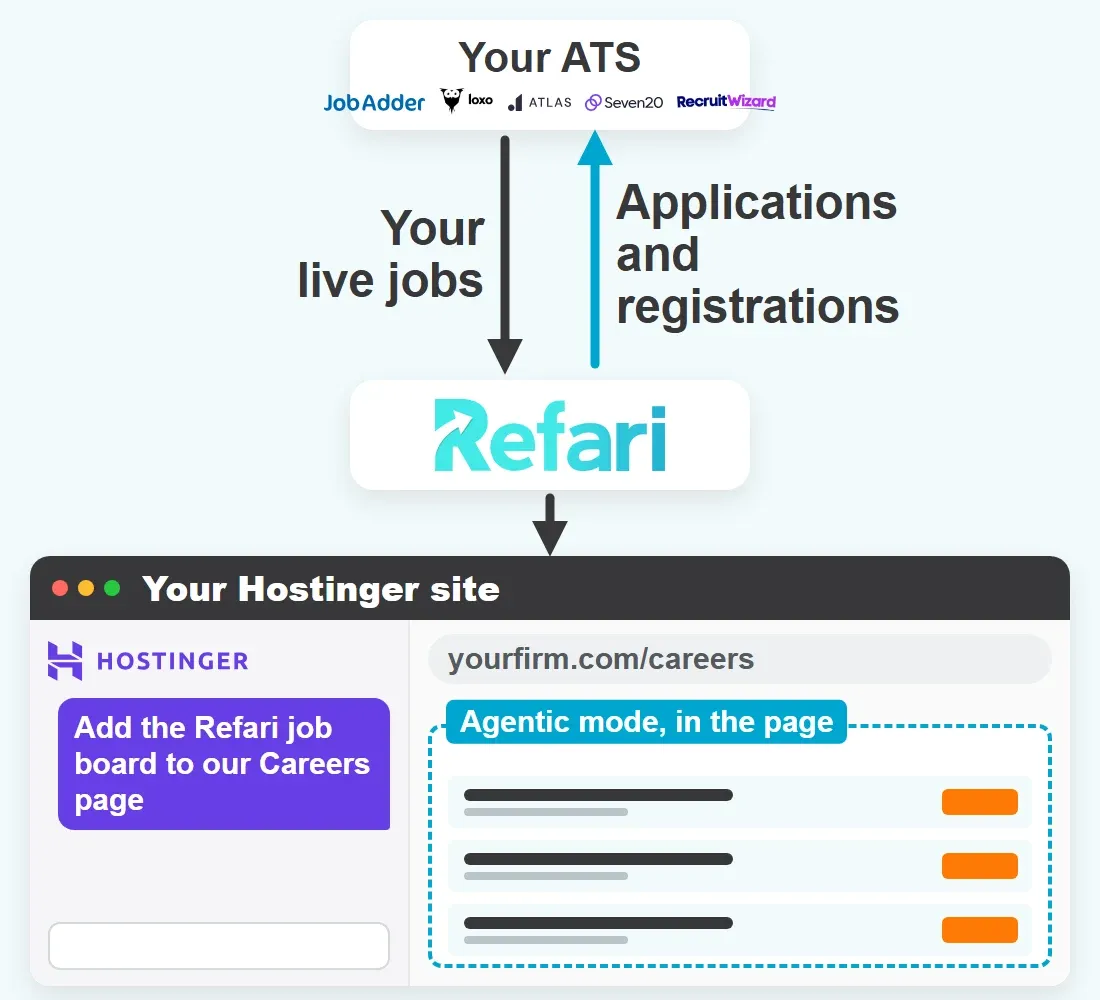
Built your website with Hostinger? In Agentic mode, ask its AI chat to place your Refari embed code on the careers page itself, and that page carries a live job board, job alerts and referrals, with each candidate’s application landing in the ATS you already use.

Request A Demo
Refari and Hostinger

One Builder, Two Ways to Build

Hostinger’s AI Builder merged its old Website Builder and Hostinger Horizons into one product with two modes. Manual mode is the drag and drop editor many agencies still call Hostinger Website Builder. Agentic mode, the old Horizons, builds the site from what you type into a chat, and its code exports as a React and Vite project. Only Agentic mode has the AI chat.

A Refari widget is a set of scripts and an empty container, and it has to run in the page itself. Refari’s advice for Hostinger is to hand that code to Agentic mode’s AI chat and ask for it on your careers page, rather than reaching for Manual mode’s Embed code element, which Refari has found runs code in a frame.

  • Hosting and SSL are part of every Hostinger AI Builder plan
  • Refari widgets are not tied to a domain, so a test address works as well as your own
  • Jobs are held in Refari and your ATS; the Hostinger site only displays them
  • A job board, job alerts, referrals and registration forms all use the same kind of code
Your ATS sends jobs to Refari, Refari shows them in a job board on your Hostinger careers page, and applications go back to your ATS

Add the Job Board With Hostinger’s AI Chat

Hostinger asks you to say in your prompt what code needs adding and where, so the prompt below names both. In Agentic mode there is also a Code tab, where you can open a file such as index.html, read what the chat wrote and save a change of your own.

  1. Copy Your Widget Code

    In Refari, open Widgets, pick the job board, choose its colours and layout, then click COPY ALL. Only Refari Admins and Managers see the Widgets section.

  2. Open the Site in Agentic Mode

    In Hostinger, go to Websites, choose Edit site on your website and use its chat. A Manual mode site first needs Continue in Agentic mode from the editor’s menu, which makes an Agentic mode copy.

  3. Send the Prompt

    Paste the example prompt below into the chat, put your copied code where the square brackets are, and send it.

  4. Read the Result in the Code Tab

    Open the Code tab and confirm the loader is added only once, the container sits on your careers page with its id unchanged, and that neither sits inside an iframe.

  5. Publish, Then Set the Base URL

    Publish the site. Then, in Refari under Settings > Job Board Settings, set the Base URL to the live careers page so links in job alerts and emails open there.

  6. Test the Live Page

    Open a registration form on the published page: a reCAPTCHA box with no error means the code runs in the page. Then open a job, copy the address into a new tab, and click a job link in a Refari job alert email. Both should open that job.

Example prompt for Hostinger’s AI chat in Agentic mode
Add the Refari job board to our Careers page. Here is the embed code from Refari:

[paste the COPY ALL code from Refari here]

Rules for placing it:
- Put the container div on the Careers page exactly as pasted, keeping its id, full width with no fixed height.
- Keep the Refari scripts in their original order, and load the Refari loader script only once for the whole site. Never add it a second time.
- Run the configuration only after the loader has loaded, and run it each time the Careers page mounts.
- Do not write raw script tags inside JSX.
- Never put any of the code inside an iframe or an embed element.
- Keep the query string and the part after # in the page address exactly as they are.

COPY ALL already carries your API key. Swap the square-bracket line for your own code and there is nothing else to add.

Where Hostinger Sites Trip Up a Job Board

Several of these come from Manual mode habits carried over to a careers page. Work through them in this order.

  • The Embed Code Element

    In Manual mode, the Add elements panel offers an Embed code element, and it is the obvious place to paste. Refari has found it runs your code in a frame, where forms show “Invalid domain” and job links and filters stop working.

    In Agentic mode, ask the AI chat to add the code to the page itself.

  • Custom Code Reaches Every Page

    Manual mode’s site-wide box, under More > Integrations > Custom code, places scripts at the end of every page. Hostinger does not say where other markup from that box lands, so it is no home for a board meant for one careers page.

    Keep the job board on the careers page; if you try Custom code for a floating widget, check it on the live site.

  • Nothing Shows in the Manual Mode Editor

    Hostinger’s Manual mode help says custom code renders only on the live website or in Preview mode, never inside the editor, so an empty space there is normal.

    Use Preview, or publish and look at the live page.

  • A Change That Never Went Live

    In Manual mode nothing reaches visitors until you click Update website, and a cached copy in your browser can hide a change you did publish.

    Click Update website after every change, then reload with the cache cleared.

  • The Board Empties After a Page Change

    An Agentic mode site is usually a React app that swaps pages without a full reload. In general React practice, a widget configured once may not find its container the second time.

    Ask the chat to run the configuration each time the careers page mounts.

  • A Careers Page Hidden From Search

    In Manual mode, a page with Hide from search results switched on in its SEO settings is marked noindex, so search engines leave it out.

    Leave that setting off on your careers page.

Hostinger Careers Pages and Your ATS

Your Hostinger page asks Refari for jobs on every visit, so the ATS behind it changes what moves and how quickly, never the code the AI chat places.

Trusted By

Join the Success: 400+ Companies Thriving with Refari!

Questions About Hostinger and Refari

What recruitment teams ask before they put a Refari job board on a site built with Hostinger’s AI Builder.

Do Refari widgets work on sites built with Hostinger’s AI Builder?

Yes. Refari widgets are plain JavaScript, so once the embed code runs in your careers page itself, rather than in a frame, the page lists your live jobs and takes applications.

Which Hostinger mode should I use to add the job board?

Agentic mode, through its AI chat, which Manual mode does not have. Refari’s advice for Hostinger is to ask the chat to add the code to the page itself. In Manual mode, the Embed code element runs code in a frame and the site-wide Custom code box reaches every page.

Can I paste the code into the Embed code element in Manual mode?

No, not for Refari widgets. Refari has found that element runs your code in a frame, so reCAPTCHA shows “Invalid domain” on the forms and job links and filters stop working.

What if my Hostinger site was built in Manual mode?

Copy it into Agentic mode, or ask Refari Support first. Continue in Agentic mode, in the editor’s menu, creates a new Agentic mode website from it, counted as an additional website on your plan, and leaves the Manual site unchanged. Edits in the copy never flow back, and sites using Ecommerce, the Instagram element or search cannot switch.

Why is the job board blank in the Hostinger editor?

Because, by Hostinger’s Manual mode help, custom code shows only on the live website or in Preview mode, never in the editor. In either mode, judge the board on the published page.

Do I need to publish again when my jobs change?

No. The board fetches your jobs from Refari each time the page loads. You publish in Hostinger when you add the code, and after that only when you change the page itself.

Do I need a paid Hostinger plan?

Yes, for the AI chat. Agentic mode runs on one of Hostinger’s credit-based subscriptions and needs an active hosting plan to publish, while Manual mode comes with most Hostinger Web and Cloud hosting plans. Hostinger also offers a free trial with 250 AI credits and no card needed.

Will Google index my Hostinger careers page?

Yes, unless the page has Hide from search results switched on in its SEO settings, which marks it noindex. Indexing the careers page is not the same as Google for Jobs, which needs a page for each job.

Will my jobs appear in Google for Jobs from my Hostinger site?

Not from the widget. Google for Jobs reads one page per job with job posting markup, and a job board widget opens every role inside your careers page. Google for Jobs comes with a website Refari builds.

Do job links work on a Hostinger site?

Test them on your own site, because Hostinger does not document how its pages treat query strings or the part of an address after #. Open a job on the published board, which adds #detail and the job’s number to the address, and open that address in a new tab. Then click a job in a Refari job alert email, whose link carries ?job= and the job’s reference. If both open the job, your links work.

Can I use my own domain for the careers page?

Yes. Hostinger includes a custom domain free for the first year, or you can connect one you own; an Agentic mode site connects by nameservers or a CNAME record, since A records are not supported. Then point your Base URL in Refari at the careers page on that domain.

Can I export an Agentic mode site and keep the job board?

Yes. The Code tab exports the site as a React and Vite project in a .zip, and the Refari embed code is not tied to one website, so the board works wherever you host it. Hostinger notes that the site’s backend data stays behind, and you should update your Base URL if the careers page address changes.

Need Google for Jobs? Look at Refari Websites 2.0

A Hostinger site with Refari widgets gives candidates a working job board and passes their applications to your ATS. What it cannot give is an address of its own for each role, and that is what Google for Jobs reads. Refari Websites 2.0 is the managed alternative: Refari builds and hosts the site, every job gets its own page, and Google for Jobs is part of the package.

What you get Refari widgets on your Hostinger site Refari Websites 2.0
Live job board from your ATS Refari widgets on your Hostinger site: Yes, with search, filters, job alerts and referrals Refari Websites 2.0: Yes, built into the site
Applications into your ATS Refari widgets on your Hostinger site: Yes, through the Refari forms in the widget Refari Websites 2.0: Yes, the same forms
Google for Jobs Refari widgets on your Hostinger site: Not from the widget: jobs open inside your careers page, with no page of their own for Google to read Refari Websites 2.0: Included: every job has its own page with the job posting markup Google for Jobs reads
Who builds and looks after it Refari widgets on your Hostinger site: You, in your builder, on your plan Refari Websites 2.0: Refari builds and hosts it, and you ask for changes in plain English
Ask About Refari Websites 2.0

Careers Site on Hostinger? Let’s talk.

Book a demo and we’ll walk you through the Refari job board, the forms behind it and how each one connects to the ATS your team already runs.

Request A Demo

Unrivalled Product Reputation

The way our existing clients describe Refari demonstrates the impact that our tools have on their business.

1,200+

Recruiters On Refari

400+

Companies Trust Us

View All Reviews

Vercel, the Vercel design, Next.js and related marks, designs and logos are trademarks or registered trademarks of Vercel, Inc. or its affiliates in the US and other countries.

5.0 From 125 verified reviews