refariUserSession, RefariLoggedIn (Refari, 1 year): Keeps you signed in when you sign in to a Refari feature.
refari_jb_registered (Refari, Until you close the tab): Remembers that you have just registered (browser storage).
_grecaptcha (Google reCAPTCHA, Until you clear it): Keeps automated spam out of the forms; set only once you start using a form (browser storage).
_GRECAPTCHA (Google reCAPTCHA, 6 months): Google’s own cookie for the same check, on google.com; set only once you use a form.
Facebook and LinkedIn sign-in (Meta, LinkedIn, Set by them): Only if you choose “Continue with Facebook” or LinkedIn: their own cookies for signing you in.
refari_jb_spent_tracking (Refari, Until you close the tab): Remembers the job links you have already applied through, so they are not counted again; set only once you apply (browser storage).
Functional
refari_anon_token (Refari, Until you clear it): Remembers the jobs you have already applied for and credits a share you made (browser storage).
refari_anon_token_reason (Refari, Until you clear it): Notes that the identifier above was kept because you applied, enquired or shared, so we can show you already did (browser storage).
Analytics
_ga (Google, 2 years): Tells visits apart to count visitors.
_ga_* (Google, 2 years): Keeps the state of a visit.
Set by the code (Ahrefs Web Analytics, Varies): Code this site added; it may set its own cookies.
Refari visit counts (Refari, No cookies): Counts page visits for us without cookies. Your browser sends the page, the site you came from and your device type. Your IP address is not kept, and we see totals only. A local setting, rf-nocount, is stored only if you ask us not to count your visits.
Marketing
refari_jb_source_key (Refari, 30 days): Credits an application to the advert or post that brought you (browser storage).
Recognised across Refari sites
refari_fingerprint (Refari, Until you clear it): A browser identifier Refari uses on recruitment websites that use Refari, to count unique views and prevent abuse (browser storage).
Using JobAdder, with a website you built in Lovable? Refari turns the ads you post in JobAdder into a searchable job board on your Lovable careers page, and sends each application and registration back into JobAdder.
What Moves Between JobAdder and Your Lovable Careers Page
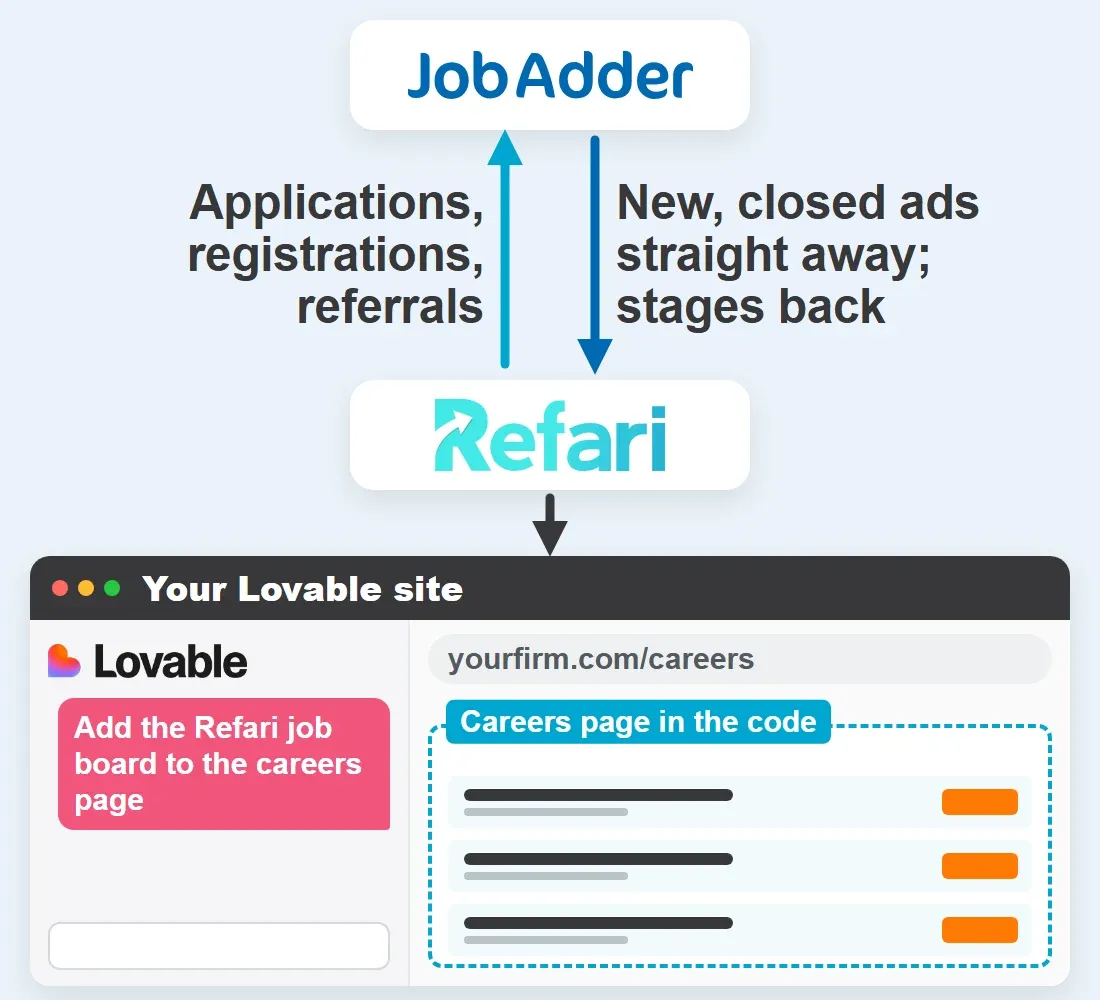
The job board on your Lovable site reads your jobs from Refari each time the page loads, and Refari keeps them in step with JobAdder through its own two-way integration. Your Lovable project never needs editing when a role opens or closes.
Into Refari
New Ads, Straight Away
Post an ad to your Refari job board in JobAdder and a JobAdder webhook tells Refari at once, so the role is on your Lovable careers page without anyone opening Lovable.
Into Refari
Expired Ads Come Down
When an ad expires in JobAdder, the same webhook takes it off your board straight away, so candidates never apply for a closed role.
Into Refari
Edits Within a Few Hours
Change the salary or the description of a live ad and the update follows on Refari’s schedule, within a few hours.
Back to your ATS
Applications Into JobAdder
Each application made on your Lovable site goes into JobAdder, so nobody re-keys a candidate from an email.
Back to your ATS
Registrations and Screener Answers
Candidate registrations go into JobAdder too, along with the answers to any screener questions you add to the forms.
Back to your ATS
Referrals, Both Directions
A referral made on your Lovable site is pushed into JobAdder, and one your team logs in JobAdder from Actions > Refari > Log/View Referral is pulled into Refari.
Back to Refari
Statuses Drive Referrer Updates
As candidates move through your JobAdder statuses, Refari can tell their referrers how they are getting on. None of it is shown on your website.
JobAdder and Refari are connected once, then the job board code goes into Lovable once. After that, the ads you post in JobAdder do the rest.
1
Ask JobAdder for a Refari Job Board
Raise a request with JobAdder for a Refari job board. Refari then emails you a link, and signing in through it connects your JobAdder account.
2
Post an Ad to the Board
In JobAdder, post a live ad to your Refari job board, so there is a real role to see when you test.
3
Copy the Job Board Code
In Refari, open Widgets, choose the job board, set its look and click COPY ALL. You need to be a Refari Admin or Manager.
4
Give the Code to Lovable
Paste the prompt below into your Lovable project chat with your code in it, or place the code yourself in the Code tab on a paid plan.
5
Publish and Set Your Base URL
Publish your changes in Lovable, then set the Base URL under Settings > Job Board Settings in Refari to your careers page, so job alert links open there.
6
Apply as a Test Candidate
On the published site, open your test ad and apply. The application should arrive in JobAdder, and the form’s reCAPTCHA should load without an error.
Example prompt: the JobAdder job board in Lovable
On our /careers page, add our JobAdder jobs using the Refari job board embed code below.

[paste the COPY ALL code from Refari here]

- Put the empty container div in the careers page component, full width, with no fixed height.
- Load the Refari loader script once and run the configuration script in a useEffect after the container mounts.
- Do not write the script tags into JSX or dangerouslySetInnerHTML, and never put the code in an iframe.
- When a candidate opens a job, keep the ?job= part of the address as it is.
The code from COPY ALL already holds your API key, so there is nothing else to add.
When a JobAdder Ad Does Not Show on Lovable
Four checks cover almost every case, in the order worth trying them.
The Ad Is Not on the Refari Board
Only ads posted to your Refari job board in JobAdder reach Refari. An ad posted to other boards alone stays off your site.
Lovable’s editor preview can differ from the published site, so an empty board there tells you little.
Publish your changes and check the live careers page.
Forms Say “Invalid Domain”
The code is running inside a frame, so reCAPTCHA refuses it, and job links and filters fail too. Applications cannot reach JobAdder from there.
Ask Lovable to move the code out of the iframe and into the page.
Alert Links Open the Wrong Page
Job links in alerts and emails are built from the Base URL in Refari. If it still points at an old site, candidates land there.
Set the Base URL to your Lovable careers page.
Trusted By
Join the Success: 400+ Companies Thriving with Refari!
JobAdder Jobs in Google for Jobs? Choose Refari Websites 2.0
A job board on your Lovable site gives JobAdder ads a home and sends applications back to JobAdder. Google for Jobs needs more: a page of its own for every job, which a widget inside one careers page does not create. Refari Websites 2.0 does, with each JobAdder ad on its own page, and Refari builds and hosts the site for you.
What you getRefari widgets on your Lovable siteRefari Websites 2.0
Live job board from your ATSRefari widgets on your Lovable site: Yes, with search, filters, job alerts and referralsRefari Websites 2.0: Yes, built into the site
Applications into your ATSRefari widgets on your Lovable site: Yes, through the Refari forms in the widgetRefari Websites 2.0: Yes, the same forms
Google for JobsRefari widgets on your Lovable site: Not from the widget: jobs open inside your careers page, with no page of their own for Google to readRefari Websites 2.0: Included: every job has its own page with the job posting markup Google for Jobs reads
Who builds and looks after itRefari widgets on your Lovable site: You, in your builder, on your planRefari Websites 2.0: Refari builds and hosts it, and you ask for changes in plain English
Answers to the questions JobAdder users ask before they put the Refari job board on a site built with Lovable.
How quickly does a new JobAdder ad appear on my Lovable site?
Straight away. When you post an ad to your Refari job board, a JobAdder webhook tells Refari at once, and your Lovable careers page shows it the next time it loads.
I edited a live ad in JobAdder. When will my Lovable site show the change?
Within a few hours. New and expired ads update straight away, while edits to an ad that is already live follow on Refari’s schedule.
Do I need to republish my Lovable site when jobs change?
No. The job board reads your jobs from Refari each time the page loads, so you publish in Lovable once, when you add the board, and never for a job.
Do applications from my Lovable site go into JobAdder?
Yes. Applications and registrations made through the Refari forms on your Lovable site go into JobAdder, so nobody re-keys a candidate.
Do screener question answers reach JobAdder?
Yes. Answers to the screener questions on Refari’s forms flow into JobAdder with the candidate, as does marketing consent.
Where does the JobAdder job board code go in Lovable?
Lovable has no embed element, so the code goes into your project’s code. Paste it into the chat and ask Lovable to place it on your careers page, or on a paid plan edit the careers page yourself in the Code tab.
Does this work on Lovable’s Free plan?
Yes, through the chat. JobAdder and Refari do not mind which Lovable plan you are on, but on Free you cannot edit the code by hand or connect your own domain.
Will my JobAdder jobs appear in Google for Jobs from my Lovable site?
Not from the job board widget, because it shows every job inside one careers page. Google for Jobs comes with a website Refari builds, where each JobAdder ad has its own page.
Do JobAdder candidate stages show on my Lovable site?
No. Statuses come back from JobAdder to Refari, which uses them to send referrers progress updates. The job board on your site shows your live ads, not where candidates are in your process.
JobAdder Help Articles
Guides from the Refari Support Centre for connecting JobAdder, what its forms and screener questions send, and installing the widget.
Great platform and service - they really go above and beyond for their clients! Refari's support is unmatched by any other website and technology partner we've ever used. They manage all website plug-ins that help us easily serve our candidates and clients.
G
Gemma Valentine
Refari has been a great asset to our business for all of the products and services that they offer. Aaron, Ritesh and the team are really quick and helpful, smart and passionate people who get recruitment.
R
Rachael Newton
Aaron and his team are amazing! Their advice has helped us improve the look and effectiveness of our website. I would highly recommend them.
Good Moves
I have worked with Refari on a couple of projects and I couldn't recommend them enough! The tech is the best on the market, their team are efficient, innovative and supportive. I have worked with a few other recruitment website suppliers over the years, I don't want to name names (bright pink) and they out beat and perform them in every sense! You can't go wrong with Refari
Emma Tawse
Working with Refari has been standout. A web developer who not only understands but embraces the need for design perfection is rare – and his collaborative approach makes the process seamless. He brings thoughtful UX insight that elevates our design work, and the end results are always stronger because of his input. Quite simply, the best web developer I’ve had the pleasure of working with.
Jay Daviot
Aaron and his team have been great to deal with throughout the entire process. Quick to act, responsive to our queries and worked through things methodically with an eye for detail. Couldn't recommend them more highly.
Ryan Corp
We had a fantastic experience working with Refari. Aaron and his team was professional, responsive, and really took the time to understand what we needed for our website. The end result was modern, easy to use, and exceeded our expectations. Communication throughout the process was clear and friendly, and they made the whole experience stress-free. I’d happily recommend Refari to anyone looking for a reliable and creative website partner!
Julianne Haines
Aaron is very prompt with responses and edits I highly recommend his service
Chris Twine
We've worked with Aaron and his team at Refari for over a year now, they've been great from the start. Always helpful, knowledgeable and willing to assist with any website development needs.
Liam Hynes
Super quick response and action time, really helpful and knows the industry to modern standards 5*
Theo Venables
Great team. Really responsive and explain things in a way that actually makes sense, even if you are not tech savvy.
Ellen Babij
Aaron and the team at Refari are great! Fab product and fab support. They go above and beyond for their clients and are always just an email away!